Name of Update: PSSSB Group D Admit Card 2026 – Hall Ticket Download, Exam Date & Direct Link
Brief Information: The Punjab Subordinate Services Selection Board (PSSSB) has released the Group D Admit Card 2026 for the written examination under Advertisement No. 04/2026. A total of 2,098 vacancies are available for Group D posts. These include Servant, Watchman, and other equivalent posts. Candidates can now download their hall tickets from the designated portal. If you are preparing for Punjab government jobs, visit our latest jobs section for more updates. The written examination is scheduled for 25 October 2026. Therefore, candidates should download their admit cards early. They should also check their exam date, reporting time, and examination centre details.
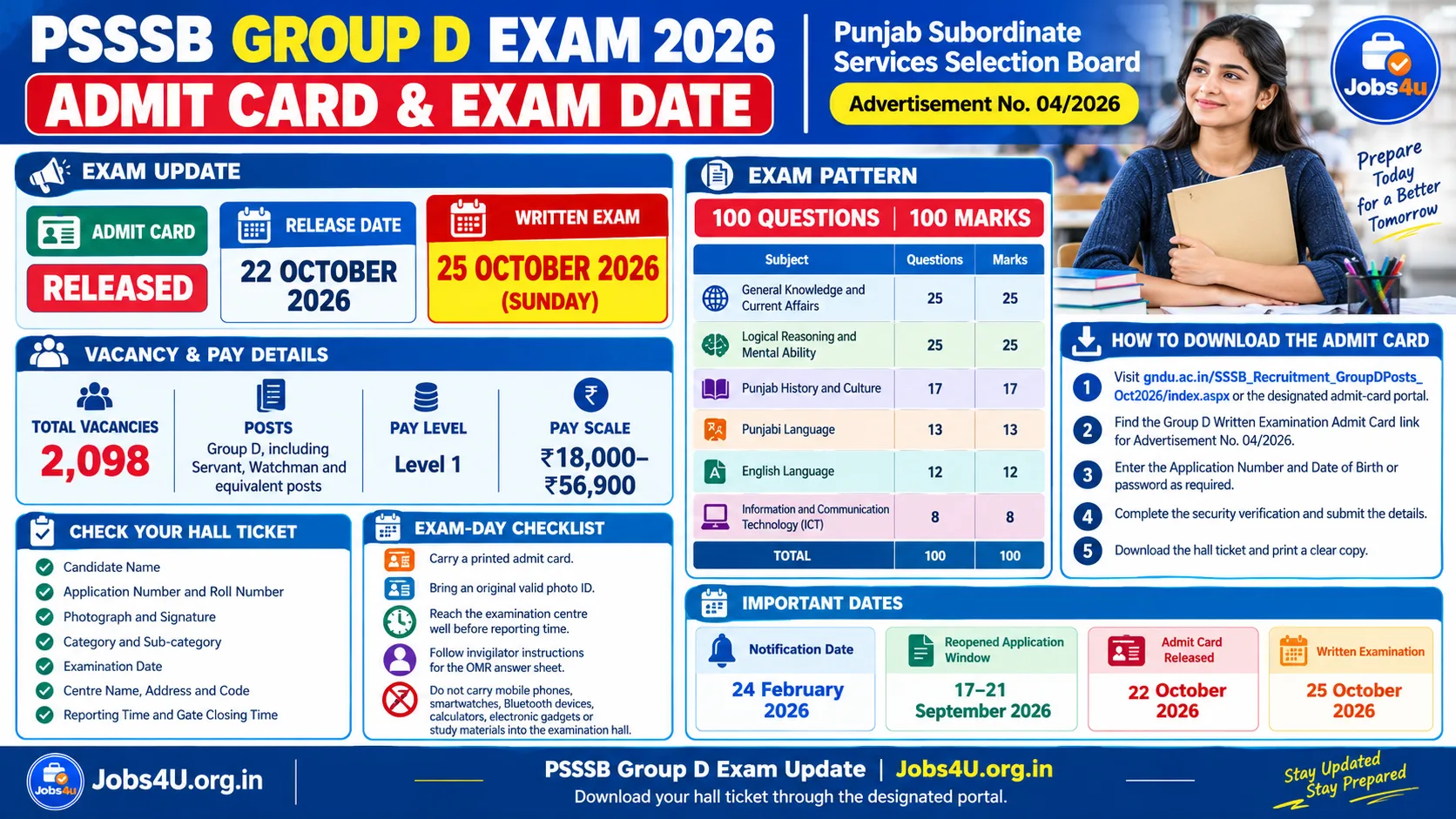
Punjab Subordinate Services Selection Board (PSSSB)Group D Recruitment Written Examination 2026Advt No: 04/2026 | |
Important Dates – PSSSB Group D 2026
| |
| Vacancy Details & Pay Scale 2026 | |
| Post Name | Total Vacancies |
| Group D (Servant, Watchman & Other Equivalent Posts) | 2,098 |
| Pay Scale: Rs. 18,000 to Rs. 56,900/- (Pay Level 1) | |
| PSSSB Group D Exam Pattern 2026 (Objective Type) | |
| Subject / Section | Number of Questions & Marks |
| General Knowledge and Current Affairs | 25 Questions (25 Marks) |
| Logical Reasoning and Mental Ability | 25 Questions (25 Marks) |
| Punjab History and Culture | 17 Questions (17 Marks) |
| Punjabi Language | 13 Questions (13 Marks) |
| English Language | 12 Questions (12 Marks) |
| Information and Communication Technology (ICT) | 8 Questions (8 Marks) |
| Total | 100 Questions (100 Marks) |
| Important Links – Admit Card Download | |
| Download PSSSB Group D Admit Card 2026 | Click Here to Download |
| Official PSSSB Website | Click Here to Visit |
Also Read: PSSSB Steno Typist Final Result 2026 Out – Download Common Merit List & Allotment PDF
Also Read: Punjab Lecturer Result 2026 Out – Download Subject-Wise Merit List PDF
How to Download PSSSB Group D Admit Card 2026
Candidates can download their PSSSB Group D hall ticket online. Follow the steps below to access your admit card. Keep your application details ready before you begin.
- First, visit the official PSSSB website at sssb.punjab.gov.in. Alternatively, use the direct GNDU portal link provided above.
- Next, open the “Latest Announcements” or “Admit Card” section on the homepage.
- Look for the link titled “Admit Card for Group D Written Examination (Advt No. 04/2026)”.
- Click the link to open the login page. Then, enter your Application Number and Date of Birth or password, as required.
- Complete the Captcha or security verification. After that, click “Submit”.
- Your PSSSB Group D Admit Card 2026 will appear on the screen.
- Check your name, roll number, exam date, shift timing, and venue address carefully.
- Finally, download the admit card PDF. Print a clear copy and carry it to the examination centre.
Details Mentioned on the PSSSB Group D Hall Ticket
After downloading your admit card, check all the details carefully. Make sure the information is correct. If you find any errors, contact the PSSSB helpdesk immediately.
- Candidate’s Full Name, Father’s Name, and Mother’s Name
- Application Number and Roll Number
- Candidate’s Photograph and Signature
- Category and Sub-category
- Exam Date: 25 October 2026
- Examination Centre: Name, Full Address, and Centre Code
- Reporting Time and Gate Closing Time
Important Instructions for PSSSB Group D Exam Day
Candidates should prepare for the examination in advance. Follow the official instructions to avoid last-minute problems. Also, check your admit card before leaving for the exam centre.
- Mandatory Documents: Carry a printed copy of your PSSSB Group D Admit Card. You must also bring a valid original photo ID. Accepted examples may include an Aadhaar Card, PAN Card, Voter ID, or Driving Licence.
- Reach the examination centre before the reporting time. This will allow you to complete biometric and identity verification. Latecomers may not be allowed to enter.
- Do not carry prohibited items into the exam hall. These include mobile phones, smartwatches, Bluetooth devices, calculators, study materials, and other electronic gadgets.
- Follow the invigilator’s instructions while filling out the OMR answer sheet. Check your entries before submitting it.
Also Read: RRB Station Master Recruitment 2026 – Apply Online for 1250 Posts (CEN 08/2026)
PSSSB Group D Admit Card 2026 FAQs
Q: When will the PSSSB Group D Written Exam 2026 be held?
Ans: The PSSSB Group D written examination is scheduled for Sunday, 25 October 2026.
Q: How can I download my PSSSB Group D Hall Ticket?
Ans: Visit the designated portal through the official website or the direct link provided above. Then, log in using your Application Number and Date of Birth, as required.
Q: What should I do if I cannot download my admit card?
Ans: First, check your Application Number and Date of Birth. If the website is slow, try again after some time. However, contact the PSSSB recruitment helpdesk if the problem continues.
Q: What is the selection process for PSSSB Group D recruitment?
Ans: The selection process includes a 100-mark objective-type written examination. Candidates who meet the applicable cut-off may then be called for Document Verification (DV), as per the recruitment rules.
Q: Which documents should I carry to the exam centre?
Ans: Carry a printed copy of your official admit card and a valid original photo ID. For example, you may carry an Aadhaar Card or Voter ID, subject to the official instructions.